

软件简介
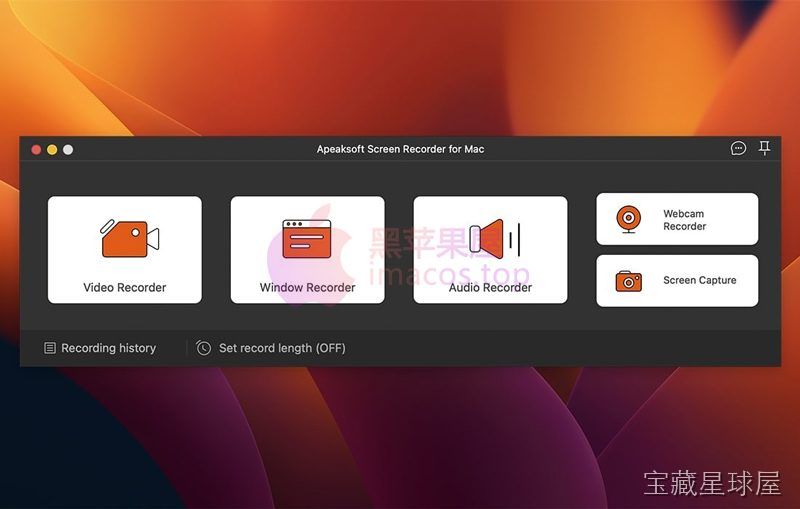
Apeaksoft Screen Recorder 2.2.16 是一款适用于 OS X 10.10 及以上系统的屏幕录制软件,支持全屏、应用窗口或自定义区域录制,同时捕捉系统声音与麦克风音频。软件提供 1080p 及 4K 高清输出,并支持录制过程中实时添加文字、箭头等标注。适合制作教程、录制游戏过程、保存在线会议或演示内容。
核心功能
- 多区域录制模式:可选择全屏、单个应用窗口或手动框选区域,满足不同场景的录制需求。
- 双音轨同步采集:同时录制系统内部声音与麦克风输入,确保解说与画面内容对齐。
- 实时屏幕标注:录制过程中添加文字、形状、箭头和高亮标记,便于教学或功能演示,减少后期编辑。
- 高分辨率输出:支持 1080p 与 4K 清晰度录制,配合先进编码技术降低延迟,减少高负载任务下的卡顿。
- 定时录制与快捷操作:预设计划自动开始与结束录制,并可通过热键快速控制常用功能,提升操作效率。
软件信息
| 软件名称 | Apeaksoft Screen Recorder |
| 软件原名 | Apeaksoft Screen Recorder |
| 版本号 | 2.2.16 |
| 开发者 | Apeaksoft |
| 发布日期 | 2025-12-30 |
| 软件类别 | Programs |
| 支持架构 | ARM, x86 (64-bit) |
| 系统要求 | OS X 10.10 and later |
| 兼容性 | OS X 10.10 and later |
| 软件大小 | 35 MB |
安装说明
Mount the image and run Open Gatekeeper friendly.
Press Enter to bypass Gatekeeper in the Terminal window.
Drag the application to the Applications folder.
The appliation is ready for use.
How to install and activate?
Mount the image and run Open Gatekeeper friendly.Press Enter to bypass Gatekeeper in the Terminal window.Drag the application to the Applications folder.The application is ready for use.ATTENTION! SIP must be disabled. Learn more >
How to disable SIP?
Restart your Mac and hold down Command + R to enter Recovery Mode.Open Terminal from the Utilities menu.Enter the command: csrutil disableRestart your Mac.
The application is damaged and cannot be opened?
This is a common Gatekeeper issue. Follow these steps:1. Open Terminal2. Enter: sudo xattr -rd com.apple.quarantine /Applications/AppName.app3. Replace "AppName" with the actual application name4. Press Enter and enter your password
Mount the image and run Open Gatekeeper friendly.
Press Enter to bypass Gatekeeper in the Terminal window.
Drag the application to the Applications folder.
The appliation is ready for use.
软件截图
下载链接
夸克网盘(永久有效):https://pan.quark.cn/s/c46fee7fd1e9
本站整理发布,仅供学习交流,请在下载后 24 小时内删除,喜欢请支持正版。


























暂无评论内容