
软件简介
BookMaster 3.1.6 是一款帮助读者、研究人员和图书管理员整理个人或机构藏书的工具。它支持录入实体书和电子书信息,追踪借阅记录,并生成阅读统计报告,适合藏书量较大的管理场景。
核心功能
- 录入书名、作者、出版社、出版日期、类别和自定义备注,实体书可附加位置、借出记录和品相状态。
- 提供高级搜索和多重筛选,可按照类别、出版日期或个人评分快速定位书目。
- 支持导入电子书元数据,追踪阅读进度并将电子书与账号关联以便访问。
- 生成馆藏报告,统计最常阅读的作者、藏书最多的类别或借阅频率最高的书籍。
- 数据存储于本地或安全云空间,方便在不同设备间保持同步。
软件信息
| 软件名称 | BookMaster |
| 软件原名 | BookMaster |
| 版本号 | 3.1.6 |
| 开发者 | Sheepsystems |
| 发布日期 | 2025-12-30 |
| 软件类别 | Performance |
| 支持架构 | ARM, x86 (64-bit) |
| 系统要求 | macOS 11 and later |
| 兼容性 | macOS 11 and later |
| 软件大小 | 22 MB |
安装说明
Mount the image and run Open Gatekeeper friendly.
Press Enter to bypass Gatekeeper in the Terminal window.
Drag the application to the Applications folder.
The application is ready for use.
How to install and activate?
Mount the image and run Open Gatekeeper friendly.Press Enter to bypass Gatekeeper in the Terminal window.Drag the application to the Applications folder.The application is ready for use.ATTENTION! SIP must be disabled. Learn more >
How to disable SIP?
Restart your Mac and hold down Command + R to enter Recovery Mode.Open Terminal from the Utilities menu.Enter the command: csrutil disableRestart your Mac.
The application is damaged and cannot be opened?
This is a common Gatekeeper issue. Follow these steps:1. Open Terminal2. Enter: sudo xattr -rd com.apple.quarantine /Applications/AppName.app3. Replace "AppName" with the actual application name4. Press Enter and enter your password
Mount the image and run Open Gatekeeper friendly.
Press Enter to bypass Gatekeeper in the Terminal window.
Drag the application to the Applications folder.
The application is ready for use.
下载链接
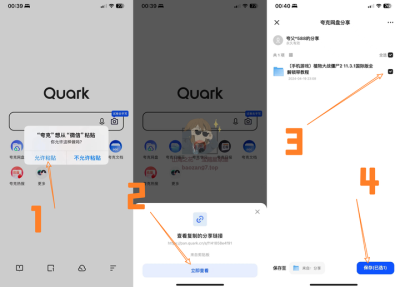
夸克网盘(永久有效):https://drive.uc.cn/s/4d840922aac74?public=1
本站整理发布,仅供学习交流,请在下载后 24 小时内删除,喜欢请支持正版。

























暂无评论内容