

软件简介
Power Menu 是一款面向 macOS 11.5 及以上系统的轻量级菜单栏工具,旨在帮助用户快速访问常用系统控制指令。它将关机、重启、睡眠、锁定屏幕、注销及强制退出应用等操作整合到菜单栏内,无需多次打开系统设置。适合需要频繁管理系统状态或追求操作效率的开发者、设计师、学生及远程办公人员使用。
核心功能
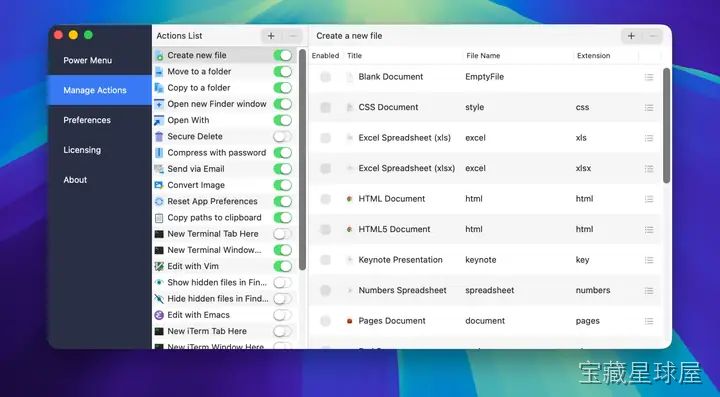
- 即时系统控制:菜单栏中直接提供关机、重启、睡眠、锁定屏幕、注销与强制退出应用的一键指令,减少多级菜单导航步骤。
- 菜单栏集成:工具原生嵌入 macOS 菜单栏,保持界面简洁,不占用额外桌面空间,用户可随时调用而不必切换窗口。
- 自定义命令与快捷操作:支持用户添加自定义脚本、应用或自动化工作流,直接从菜单栏触发,适用于需要重复执行特定任务的开发者与 IT 专业人员。
- 轻量性能:运行时不占用大量 CPU 或内存资源,在后台保持低消耗,适合同时运行视频编辑、设计工具或开发环境等资源密集型应用的用户。
软件信息
| 软件名称 | Power Menu |
| 软件原名 | Power Menu |
| 版本号 | 1.22 |
| 开发者 | FIPLAB Ltd |
| 发布日期 | 2026-05-16 |
| 软件类别 | Programs |
| 支持架构 | ARM, x86 (64-bit) |
| 系统要求 | macOS 11.5 and later |
| 兼容性 | macOS 11.5 and later |
| 软件大小 | 18 MB |
安装说明
Mount the image and run Open Gatekeeper friendly.
Press Enter to bypass Gatekeeper in the Terminal window.
Drag the application to the Applications folder.
The application is ready for use.
How to install and activate?
Mount the image and run Open Gatekeeper friendly.Press Enter to bypass Gatekeeper in the Terminal window.Drag the application to the Applications folder.The application is ready for use.ATTENTION! SIP must be disabled. Learn more >
How to disable SIP?
Restart your Mac and hold down Command + R to enter Recovery Mode.Open Terminal from the Utilities menu.Enter the command: csrutil disableRestart your Mac.
The application is damaged and cannot be opened?
This is a common Gatekeeper issue. Follow these steps:1. Open Terminal2. Enter: sudo xattr -rd com.apple.quarantine /Applications/AppName.app3. Replace "AppName" with the actual application name4. Press Enter and enter your password
Mount the image and run Open Gatekeeper friendly.
Press Enter to bypass Gatekeeper in the Terminal window.
Drag the application to the Applications folder.
The application is ready for use.
软件截图
下载链接
夸克网盘(永久有效):https://pan.quark.cn/s/fa11c20618a9
本站整理发布,仅供学习交流,请在下载后 24 小时内删除,喜欢请支持正版。


























暂无评论内容