
软件简介
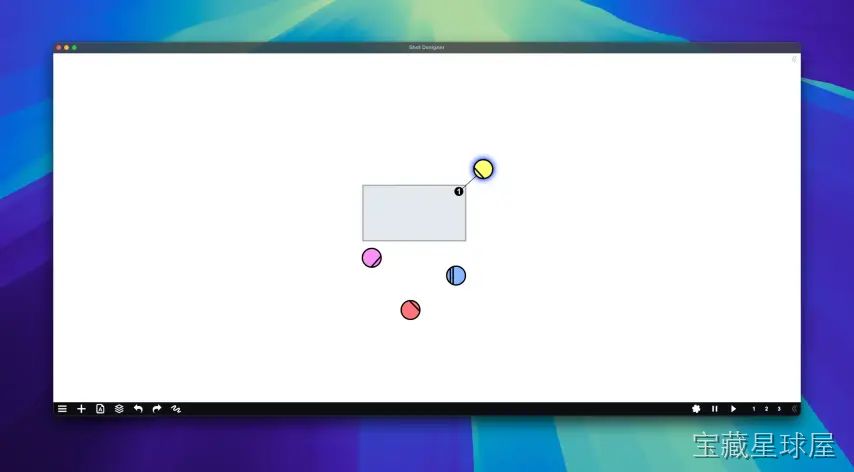
Shot Designer 1.80.8 是一款为导演、摄影师和制片团队设计的镜头规划软件。用户在场景平面图中摆放虚拟摄像机、规划演员行动路线,并记录镜头参数,把前期筹备阶段的分镜和调度工作集中到一个数字工作区里完成。
核心功能
- 摄像机锁定工具:在场景中放置虚拟摄像机并测试多角度构图,帮助导演在实拍前探索不同视觉叙事方案。
- 演员走位规划:设定演员的进出场位置、停留点及移动路径,优化场景节奏、动作编排和连续性。
- 镜头参数记录:为每个镜头指定焦距、景别、运镜方式、场景备注和技术说明,生成更详细的拍摄计划供摄制组参考。
- 灯光布置功能:在场景设计中放置灯具元素,让摄影师在到达现场前提前规划布光方案。
- 多场景集中管理:统一组织多个场次的镜头、机位设置和制作笔记,减少拍摄现场沟通误差。
软件信息
| 软件名称 | Shot Designer |
| 软件原名 | Shot Designer |
| 版本号 | 1.80.8 |
| 开发者 | Hollywood Camera Work |
| 发布日期 | 2026-05-16 |
| 软件类别 | Programs |
| 支持架构 | ARM, x86 (64-bit) |
| 系统要求 | macOS 10.13 and later |
| 兼容性 | macOS 10.13 and later |
| 软件大小 | 53 MB |
安装说明
Run the downloaded image and drag the application to the Applications folder shortcut.
Once copying is complete, the application can be launched via Launchpad.
How to install and activate?
Mount the image and run Open Gatekeeper friendly.Press Enter to bypass Gatekeeper in the Terminal window.Drag the application to the Applications folder.The application is ready for use.ATTENTION! SIP must be disabled. Learn more >
How to disable SIP?
Restart your Mac and hold down Command + R to enter Recovery Mode.Open Terminal from the Utilities menu.Enter the command: csrutil disableRestart your Mac.
The application is damaged and cannot be opened?
This is a common Gatekeeper issue. Follow these steps:1. Open Terminal2. Enter: sudo xattr -rd com.apple.quarantine /Applications/AppName.app3. Replace "AppName" with the actual application name4. Press Enter and enter your password
Run the downloaded image and drag the application to the Applications folder shortcut.
Once copying is complete, the application can be launched via Launchpad.
软件截图
下载链接
夸克网盘(永久有效):https://pan.quark.cn/s/b446f95d8c96
本站整理发布,仅供学习交流,请在下载后 24 小时内删除,喜欢请支持正版。
























暂无评论内容