

软件简介
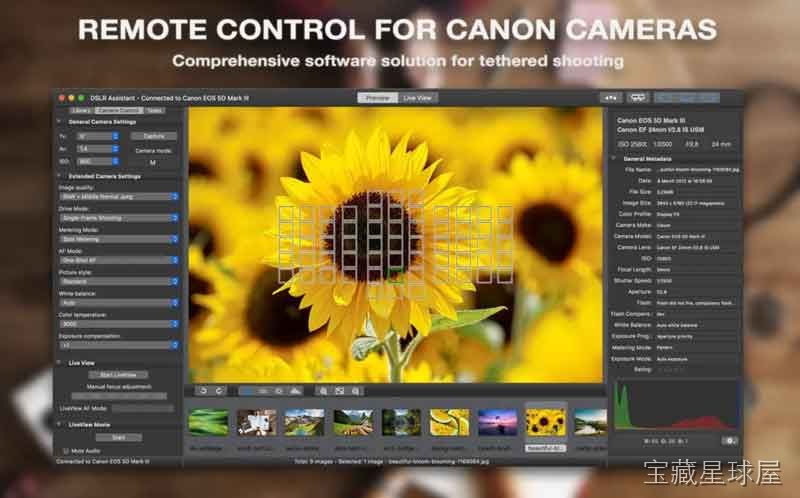
DSLR Assistant 是一款面向 Canon EOS 数码单反相机的专业联机拍摄控制软件。它通过 USB 或 Firewire 线缆将相机与 Mac 连接,把光圈、快门、ISO 等关键参数的调整和图像回放从相机小屏幕转移到电脑大屏幕上,适用于影棚拍摄、微距摄影和延时摄影等需要精细控制与高效协作的场景。它不是通用图像编辑器,而是专注于提升拍摄效率与精度的专业工具。
核心功能
- 远程相机控制:在 Mac 界面直接调整光圈、快门速度、ISO、白平衡、图像尺寸与画质等大部分关键参数,无需触碰相机机身即可完成设置。
- 实时取景与精确对焦:将 LiveView 实时画面连续传输至 Mac 屏幕,支持利用屏幕上的控制组件进行手动精确对焦,对浅景深和微距拍摄尤其有用。
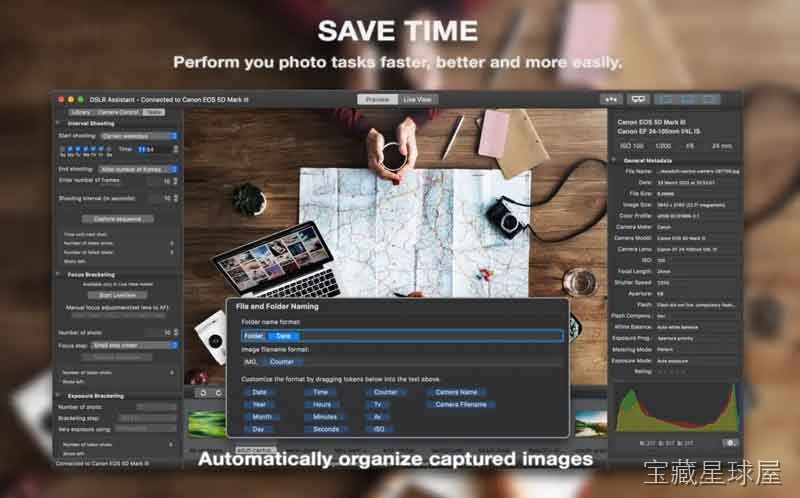
- 自动化拍摄流程:拍摄的照片自动即时传输并直接存入 Mac 硬盘,无需使用存储卡。内置图像库功能可利用令牌自动整理和重命名文件。
- 包围曝光与包围对焦:自动拍摄不同曝光等级的多张照片用于生成 HDR 图像,或自动拍摄不同焦平面的照片以扩展景深,适合微距和风光题材。
- 延时与长曝光控制:内置间隔计时器,可设定拍摄张数、间隔时间,甚至预设开始和结束时间或指定星期几执行;支持 Bulb 模式,可设置超过相机常规 30 秒上限的快门速度,用于长曝光和天文摄影。
软件信息
| 软件名称 | DSLR Assistant |
| 软件原名 | DSLR Assistant |
| 版本号 | 3.9.5 [MAS] |
| 开发者 | Alexander Khripunov |
| 发布日期 | 2026-01-10 |
| 软件类别 | Photography |
| 支持架构 | ARM, x86 (64-bit) |
| 系统要求 | macOS 10.13 and later |
| 兼容性 | macOS 10.13 and later |
| 软件大小 | 14 MB |
安装说明
Mount the image and run Open Gatekeeper friendly.
Press Enter to bypass Gatekeeper in the Terminal window.
Drag the application to the Applications folder.
The application is ready for use.
How to install and activate?
Mount the image and run Open Gatekeeper friendly.Press Enter to bypass Gatekeeper in the Terminal window.Drag the application to the Applications folder.The application is ready for use.ATTENTION! SIP must be disabled. Learn more >
How to disable SIP?
Restart your Mac and hold down Command + R to enter Recovery Mode.Open Terminal from the Utilities menu.Enter the command: csrutil disableRestart your Mac.
The application is damaged and cannot be opened?
This is a common Gatekeeper issue. Follow these steps:1. Open Terminal2. Enter: sudo xattr -rd com.apple.quarantine /Applications/AppName.app3. Replace "AppName" with the actual application name4. Press Enter and enter your password
Mount the image and run Open Gatekeeper friendly.
Press Enter to bypass Gatekeeper in the Terminal window.
Drag the application to the Applications folder.
The application is ready for use.
软件截图

下载链接
夸克网盘(永久有效):https://pan.quark.cn/s/67fe9388accb
本站整理发布,仅供学习交流,请在下载后 24 小时内删除,喜欢请支持正版。
























暂无评论内容