
软件简介
NotchFlow 1.2.1 是一款利用 Mac 屏幕刘海区域设计的效率应用,将硬件上的凹槽变成互动工作区。用户可以直接在刘海位置启动专注计时、控制音乐播放或查看休息提醒,减少切换应用的次数。适配 macOS 14 及以上系统,支持 Apple Silicon 芯片。
核心功能
- 智能番茄钟计时器:可设置 25 分钟专注时段并穿插短休息,帮助维持工作节奏,降低长时间用脑产生的疲劳感。
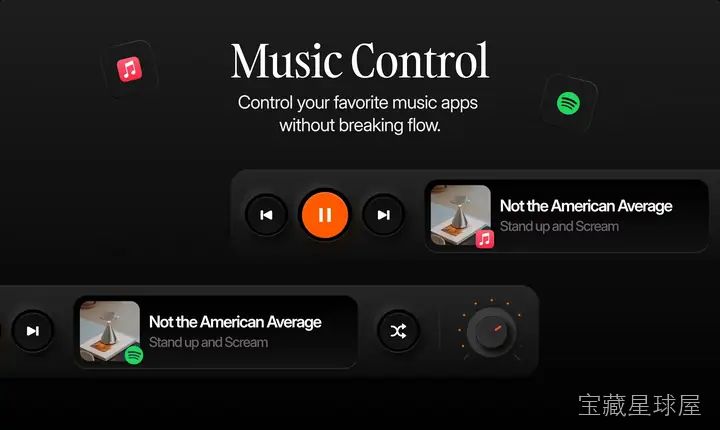
- 内置音乐控制:在刘海界面直接播放、暂停、切歌或调整音量,支持与 Apple Music 和 Spotify 联动,无需跳出当前工作窗口。
- 专注音乐曲库:提供 lo-fi、氛围音和轻器乐等分类的精选音乐,适合在需要集中注意力时播放。
- 休息提醒功能:通过不打扰的方式提醒用户起身休息,避免连续工作过久导致效率下降。
软件信息
| 软件名称 | NotchFlow |
| 软件原名 | NotchFlow |
| 版本号 | 1.2.1 |
| 开发者 | Rad & Ben |
| 发布日期 | 2026-05-16 |
| 软件类别 | Programs |
| 支持架构 | ARM, x86 (64-bit) |
| 系统要求 | macOS 14 and later |
| 兼容性 | macOS 14 and later |
| 软件大小 | 122 MB |
安装说明
Run the downloaded image and drag the application to the Applications folder shortcut.
Once copying is complete, the application can be launched via Launchpad.
How to install and activate?
Mount the image and run Open Gatekeeper friendly.Press Enter to bypass Gatekeeper in the Terminal window.Drag the application to the Applications folder.The application is ready for use.ATTENTION! SIP must be disabled. Learn more >
How to disable SIP?
Restart your Mac and hold down Command + R to enter Recovery Mode.Open Terminal from the Utilities menu.Enter the command: csrutil disableRestart your Mac.
The application is damaged and cannot be opened?
This is a common Gatekeeper issue. Follow these steps:1. Open Terminal2. Enter: sudo xattr -rd com.apple.quarantine /Applications/AppName.app3. Replace "AppName" with the actual application name4. Press Enter and enter your password
Run the downloaded image and drag the application to the Applications folder shortcut.
Once copying is complete, the application can be launched via Launchpad.
软件截图

下载链接
夸克网盘(永久有效):https://pan.quark.cn/s/a82585f86929
本站整理发布,仅供学习交流,请在下载后 24 小时内删除,喜欢请支持正版。

























暂无评论内容